Biyernes, Pebrero 24, 2017

Lesson 10

Computer As A Tutor
Image result for computer clipart

The computer is the human ingenuity. Even its original design in the 1950’s. with the intervention of the microcomputer (now also commonly referred to PC’s or personal computers, the PC has become the tool for program instructions.
The computer can be a tutor in effect relieving the teacher of many activities his personal role as classroom tutor.

Computer-assisted instruction (CAI)
-          Is an  interactive instructional technique whereby a computer is used to present the instructional material and monitor the learning that takes place. CAI uses a combination of text, graphics, sound and video in enhancing the learning process.

Available computer and CAI software, the teacher must
  1. Insure the students have the needed knowledge and skills for any computer activity.
  2. Decide the appropriate learning objective.
  3.  Plan the sequence and structured activities to achieve objectives.
  4. Evaluate the student’s achievement by ways of test the specific expected outcomes. The students in CAI play their own roles as learners as they:
  5. Receive information
  6. Understand instructions for the computer activity

-          Retain/keep in mind the information and rules for the computer activity
-          Apply the knowledge and rules during the process of computer learning
During the computer activity proper in CAI the computer, too, plays its roles as it.
-          Acts a sort of tutor
-          Provides a learning environment
-          Delivers learning instruction
-          Reinforces learning through drill-and-practice
-          Provides feedback
CAI Integrated with Lesson
CAI works best in reinforcement learning through repetitive exercise such that students can practice basic skills or knowledge in various subject area.
Simulation Programs
Simulation software materials are another kind of software that is constructivist in nature. This simulation software:
-Teacher strategies and rules applied to real-life problems/situations.
-Asks students to make decision on models or scenarios.
-Allow students to manipulate elements of a model and get the exercise of the effects of their decisions.

Examples:
-Business Simulation Games
-The Sims 1,2,3, & 4

Instructional Games
While relation to low-level learning objectives (e.g basic spelling or math skills) instructional computer games add the elements of competition and challenge.
Examples:
-Car Games
-Aircraft Games

Problem Solving Software
These are more sophisticated than the drill and practice exercise and allow students to learn and improve on their problem solving ability.
Examples:
-SUDOKU
-4pics 1word

Multimedia Encyclopedia and Electronic books
The multimedia Encyclopedia can store a huge database with texts, images, animation, audio and video.
Electronic Books

Provides textual information for reading, supplemented by other types of multimedia information (sounds, spoken words, pictures, animation). These are useful for learning reading, spelling and word skills.

Lesson 9

Computer as Information and Communication Technology

Image result for computer as information and communication technology 


In the Educational Technology Course 1 the role of the computer in education was well discussed. It was pointed out that the advent of computer is recognized as the third revolution in the education. The first was the invention of the printing press, the second, the introduction of the libraries; and the third, the invention of the computer especially so with the advent of the microcomputer in 1975. Thus emerged computer technology in education.


The Personal Computer (PC) As ICT
Until the nineties, it was still possible to distinguish between instructional media and the educational communication media.

Let’s examine the programs normally installed in an ordinary modern PC.

Microsoft Office
- program for composing text, graphics photos into letters, articles, reports, etc.

Power point 
– for preparing lecture presentation

Excel 
– for spreadsheets and similar graphic sheets

Internet Explorer 
– access to the internet

Yahoo or Google Websites
– e-mail, chat rooms, blog sites, news service, educational softwares etc.

Adobe Reader 
– graphs/photo composition and editing

MSN 
– Mail/chat messaging

Windows media player 
– CD , VCD player

Cyberlink power 
– DVD player

Windows media player 
– editing video

GameHouse 
– Video games


Lesson 8

Higher Thinking Skills Through IT-Based Projects
Image result for higher thinking skills
  •          Resource-Based Projects
  •          Simple Creations
  •          Guided Hypermedia Projects
  •          Web-Based Projects
  •      Resource-Based Projects

-          In these projects, the teacher steps out of the traditional role of being an context expert and information provider, and instead lets the students find their own facts and information.
The general flow events in the resource-based projects are:

  •      The teacher determines the topic for the examination
  •         The teacher presents the problem to the class
  •         The students find information on the problem/questions
  •        Students organize their information in the response to the problem/questions

Inquiry or Discovery Approach
-          This requires that the students, individually or cooperatively with members of his group, relate gathered information to the real world.

Traditional learning model
Resource-based learning model


Teacher is expert and information provider. Teacher is a guided and facilitator.
Textbook is the key. Source are varied.
Source of information (print, video, internet, etc.)
Focus on facts information is packaged I neat provider Emphasis on process
Assessment is quantitative
Assessment is quantitative and qualitative

Simple Creations
-          Students can also be assigned to create their software materials to supplement the need for relevant and effective materials.
-          Creativity is said to combine three kind of skills/abilities:
·         Analyzing
·         Synthesizing
·         Promoting

Analyzing

  •  Distinguishing similarities and differences/seeing the project as a problem to be solved.

Synthesizing
  •            Making spontaneous connections among ideas, thus generating interesting or new ideas.

Promoting
  •             Selling of new ideas to allow the public to test the ideas themselves.

To develop their creativity, the following five key tasks may be recommended:

Define the task. Clarify the goal of the completed project to the student.
Brainstorm. The student themselves will be allowed to generate their own ideas on the projects.
Judge the ideas. The students themselves appraisal for or against any idea. Only when students are completely off track should the teacher intervene.
Act. The students to their work with the teacher a facilitator.
Adopt flexibility. The students should be allowed to shift gears and not follow an action path rigidly.

Guided Hypermedia Projects
  • As an instructive tool, such as in the production by students of a power-point presentation of a selected topic.
  • As a communication tool, such as when students do a multimedia presentation (with text, graphs, photos, audio, narration, interviews, video clips, etc.) to simulate a television.

Hyper Studio
  • It is a software produce by Roger Wagner Production and an example of multimedia software.
Web-Based Project
  • Students can be made to create a post webpages on a given topic.

Lesson 7

Evaluation of Technology Learning
Related image
  • Evaluation is used in Educational Technology and it's meaning considering the merits of the material used. It entails about how to determine if the technology is appropriate and enhances the teaching and learning process.
  • Its strength and weaknesses as a tool for learning.
  • Teachers must adopt a new mindset both for instruction and evaluation.
  • The student standard evaluation of learning must change.
  • Today, students are expected to be not only cognitive, but also flexible, analytical and creative.
  • Students must have six important fluencies that reflect process skills: (solution fluency, information fluency, collaborative fluency, creativity fluency, media fluency and digital ethics/citizenship)

Mass Amateurization - refers to the capabilities that new forms of media have given to non-professionals and the ways in which those non-professionals have applied those capabilities to solve that compete with the solutions offered by larger, professional institutions.
  • The personal group creative activities in school should aim bridging the gap between amateur creators of outputs to professional creators of future outcomes and products in the real world.
  • The process does not entail the end of traditional report and essay writing.
  • The internet also offers avenues for publishing creative outputs and these are web sites, blogs, wikis, podcasts, and videos.
  • Relevance and engagement shall be carries both in the learning.

Lesson 6

Developing Basic Digital Skills

Image result for developing basic digital skills

As teachers adjust their teachings to effectively match the new digital world of information and communication technology (ICT), they must be clear on what basic knowledge, skills and values (or literacies) need to be developed by digital learners.


Three basic literacies:
  • Reading
  • Writing
  • Arithmetic o 'Rithmetic
Six essentials to Equip Students for success

1. Solution Fluency - this refers to the capacity and creativity in problem solving.
2. Information Fluency - this involves 3 subsets of skills, namely:
  • An ability to access information
  • An ability to retrieve information
  • An ability to reflect on
3. Collaborative fluency - this refers to teamwork with virtual or real partners in the online environment.
4. Media Fluency - Media refer to channels of mass communication (radio, television, magazine, advertising graphic arts) or digital sources.
5. Creativity Fluency - Artistic proficiency adds meaning by way of design, art and story-telling to package a message.
  • Font
  • Color
  • Patterns
  • Layout
6. Digital Ethics - The digital citizen is guided by principles of leadership, global responsibility, environmental, awareness, global citizenship, and personal accountability.

Higher Thinking Skills

  • Entering the new world of information and communication technology opens the way for complex and higher cognitive skills.

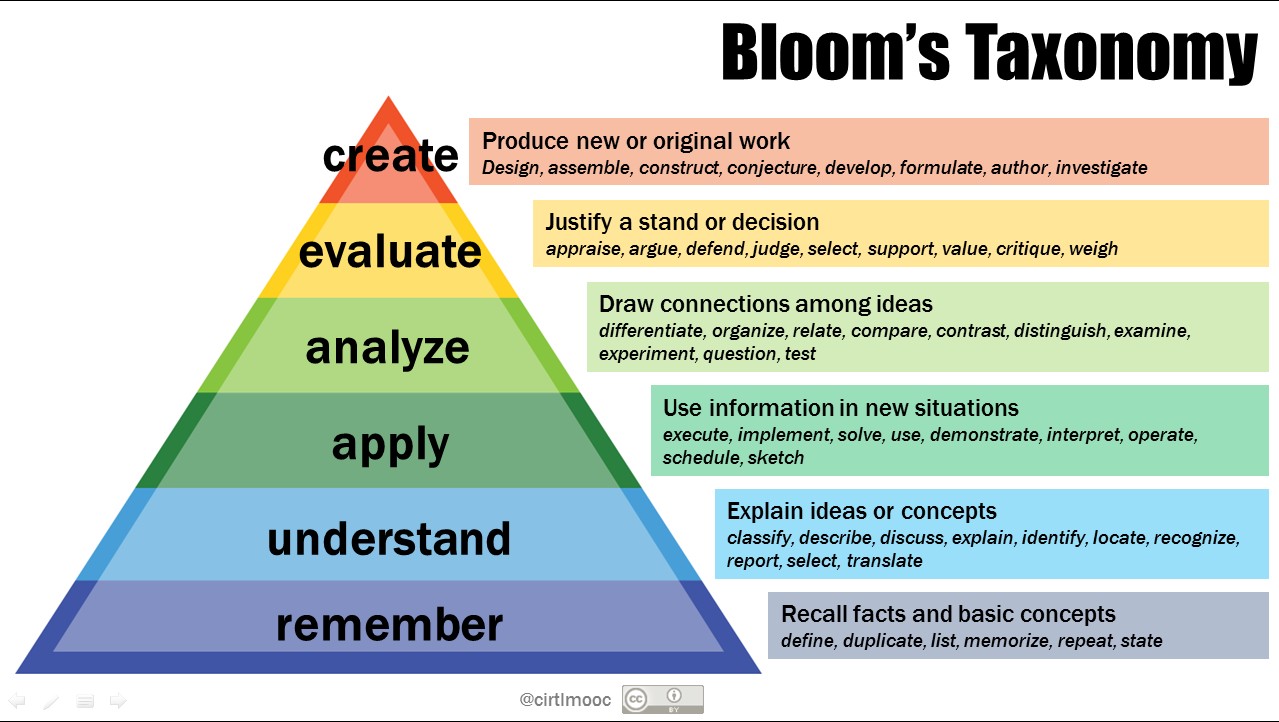
  • While Bloom's Taxonomy of Thinking Skills can serve as a general framework of skills, a new era of creativity in the digital world has led to introducing a kind of framework that requirs information processing, idea creation and real-world problem-solving skills.

Bloom's Taxonomy
Related image

The structured problem solving - process known as 4D's also exemplifies the instructional shift in digital learning.
  • Define the problem
  • Design the solution
  • Do the work
  • Debrief the outcome